 a7491daffc
Adds `AttachmentGallery` to show image thumbnails and file rows on issue/PR detail views and inline in comment bodies. A `PhotosPicker` button in the markdown toolbar lets users attach images when composing or editing; the selected image is uploaded via the Forgejo assets API and a markdown reference is inserted into the editor. Closes #79 test(ui): add AttachmentUITests — upload image and verify display Adds a combined UI test that uploads a 1×1 PNG to an issue via the markdown toolbar, submits a comment, re-enters the issue, and asserts that the Attachments section and gallery are visible. - AttachmentGallery: add accessibilityIdentifier("attachment-gallery") - MarkdownComponents: add -dev_testImageUpload launch-arg branch that bypasses PhotosPicker and uploads a hardcoded PNG, keeping the test deterministic without requiring photos in the simulator's library test(attachment): fix gallery element query and image detection for Forgejo uploads Move the attachment-gallery accessibility identifier from the VStack container to the horizontal ScrollView, which XCTest reliably exposes as a scroll view element. Update the UI test to use app.scrollViews["attachment-gallery"]. test(attachment): verify multiple image uploads render as distinct thumbnails Upload two images from the comment sheet, assert two markdown references are inserted, and after reload assert both render as thumbnails in the gallery. Confirms the ForEach(imageAttachments) gallery handles multiple attachments. test: add unit tests for attachmentMarkdown image vs link syntax Cover the pure attachmentMarkdown(for:) function directly: images (by MIME type and by extension) produce embed syntax, non-image files (log, pdf) produce link syntax. Faster and more focused than the UI test, which only exercised this indirectly. feat: wrap markdown toolbar icons and add file attachment upload The markdown toolbar used a horizontal scroll view, so trailing icons (link, list, quote, task, attach) were hidden off-screen with no visual cue. Replace it with a wrapping flow layout (MarkdownToolbarFlow) so every icon is always visible, wrapping to a second row on narrow widths. Add general file-attachment upload: the attach button is now a menu offering "Photo Library" (images via PhotosPicker) and "Choose File" (any file via .fileImporter). Picked files are read through a security-scoped resource and uploaded with a MIME type derived from the extension; non-image files insert link markdown via the existing attachmentMarkdown(for:) path. |
||
|---|---|---|
| Forji | ||
| integration | ||
| screenshots | ||
| .gitignore | ||
| .swiftformat | ||
| .swiftlint.yml | ||
| CHANGELOG.md | ||
| cliff.toml | ||
| CONTRIBUTING.md | ||
| DISTRIBUTE.md | ||
| flake.lock | ||
| flake.nix | ||
| justfile | ||
| LICENSE | ||
| PRIVACY.md | ||
| README.md | ||
Forji
A native iOS client for Forgejo
Forji is a native iOS app for managing your Forgejo repositories, issues, pull requests, and notifications from your phone. Built with SwiftUI and Swift concurrency.
Screenshots


App Store
Forji is available on the Apple App Store for free: Forji App Store
Features
Repositories
- Browse and search your repositories
- Filter by All or Starred
- Star/unstar repositories
- View repository stats (stars, forks, language, open issues)
Code Browser
- Navigate file trees
- View files with syntax highlighting
- Render Markdown previews
- Edit files and commit changes directly
- Browse commit history with diffs
- Switch branches
Issues
- View issues across all repositories or per-repo
- Filter by open/closed state and search
- Create, edit, and close/reopen issues
- Manage labels, milestones, and assignees
- Comment with Markdown support
Pull Requests
- View PRs across all repositories or per-repo
- Create PRs with branch selection, labels, milestones, assignees, and reviewers
- Review diffs with inline comments
- Submit reviews (comment, approve, request changes)
- Merge with merge commit, rebase, or squash
- Close, reopen, and edit PRs
Actions
- Browse Forgejo Actions workflows defined in a repository
- View workflow runs filtered by status (running, success, failed)
- Inspect a run's jobs with status and duration
- Read job logs
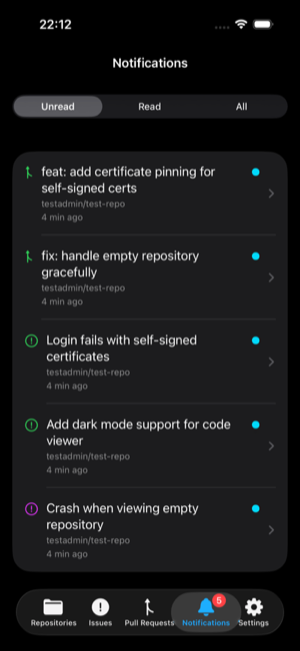
Notifications
- View unread, read, and all notifications
- Swipe to mark as read or dismiss
- Unread badge on the tab bar
Other
- Connect to any Forgejo instance (including self-hosted)
- Self-signed certificate support
- Multiple instance management
- Light, dark, and system theme
- Mermaid diagram rendering
Development
Requires Xcode 26. The project uses ForgejoKit as a remote Swift package dependency.
Dev Environment
A Nix flake provides all CLI tooling (just, xcbeautify, swiftlint, swiftformat):
nix develop # Enter dev shell with all tools available
Building & Testing
A justfile is provided for common tasks:
just build          # Build the app
just test           # Run app unit tests
just run            # Build, install, and launch in the simulator
just lint           # Lint Swift code with SwiftLint
just format         # Format Swift code with SwiftFormat
just test-ui        # Run UI integration tests (requires Docker)
just test-one Class # Run a single integration test
just test-list      # List all available integration tests
Integration tests spin up Forgejo instances in Docker, seed test data, and run UI tests against them. See integration/ for details.
Architecture
| Layer | Location | Purpose |
|---|---|---|
| ForgejoKit | Remote SPM package | Platform-agnostic Swift package with all Forgejo API logic, models, and services |
| Forji | Forji/ |
SwiftUI iOS app with views, authentication, and persistence |
ForgejoKit has no SwiftUI or platform dependencies, making it reusable for other clients (macOS, CLI, etc.). It is published as a separate package at codeberg.org/secana/ForgejoKit.
Acknowledgments
The Forji logo is based on the Forgejo logo by Caesar Schinas and is licensed under CC BY-SA 4.0.
Libraries
- ForgejoKit — Forgejo API client (MIT)
- Textual — Markdown rendering (MIT)
- HighlightSwift — Code syntax highlighting (MIT)
- mermaid — Diagram rendering (MIT)
- marked — Markdown parser (MIT)
- DOMPurify — HTML sanitizer (Apache 2.0 / MPL 2.0)
- github-markdown-css — GitHub-style Markdown styling (MIT)
Contributing
Contributions are welcome! By submitting a pull request, you agree that your contributions are licensed under the GNU General Public License v3.0 and may be distributed through Apple's App Store under the App Store Exception included in the license.
You need to inlude this sentence in your PR or a comment to agree to the distribution in the App Store:
"I grant Stefan Hausotte an irrevocable, worldwide, royalty-free license to use, sublicense, and distribute my contribution, including through Apple's App Store under the project's App Store exception."
License
Forji is licensed under the GNU General Public License v3.0 with an App Store Exception that permits distribution of the compiled application through Apple's App Store.
ForgejoKit is licensed under the MIT License.